OCuLink on a mini PC: what it does for an external graphics card
OCuLink is the port that lets some mini PCs drive a desktop graphics card through a short cable. This guide explains what it carries, how it compares with USB4 and Thunderbolt in measured tests, what else you need and how to connect it. It draws on MiniPC.guru’s own catalog, where 28 of our 193 models have OCuLink, and on tests from Notebookcheck, PC Gamer, TechPowerUp and others.
On the mini PCs we list, OCuLink is four lanes of PCIe 4.0 on a cable, about 7.9 GB/s each way, with no video, no power and no hot-plug. With the same RTX 4090 and mini PC, Notebookcheck measured 71.3 fps in Cyberpunk 2077 at 4K over OCuLink and 61.3 over USB4 v2. You also need a powered dock, a graphics card and a monitor plugged into that card. In our catalog, 28 of 193 models have OCuLink, all from GMKtec and MINISFORUM.
What OCuLink carries
OCuLink carries PCI Express, the same signal a graphics card gets from a desktop motherboard slot, over a cable. Its connectors are SNIA’s MiniLink family: SFF-8611 defines the cable plugs, in 4-lane and 8-lane sizes, and says the connector “is capable of meeting the interface requirements for the internal I/O requirements of T10 SAS-4 and OCuLink 1.0”. It lists “PCIe OCuLink” among its references; PCIe standards come from the PCI-SIG.
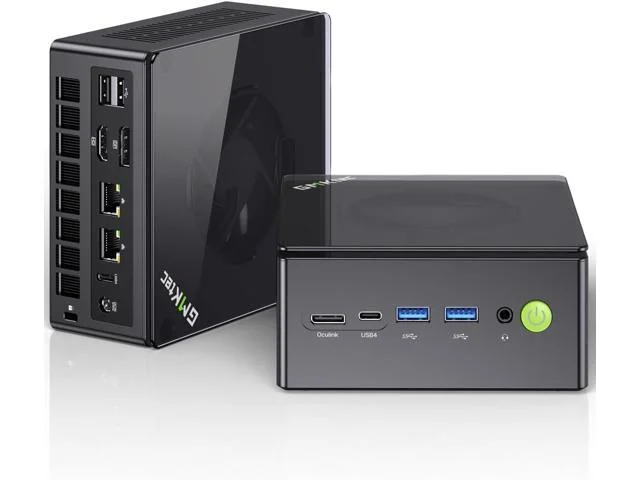
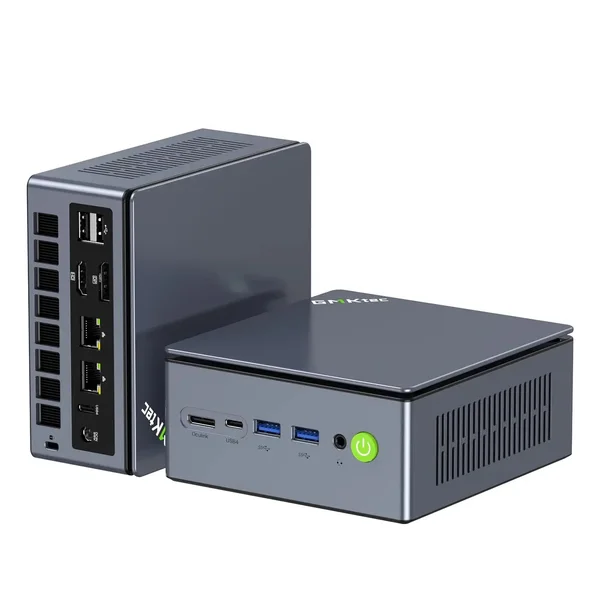
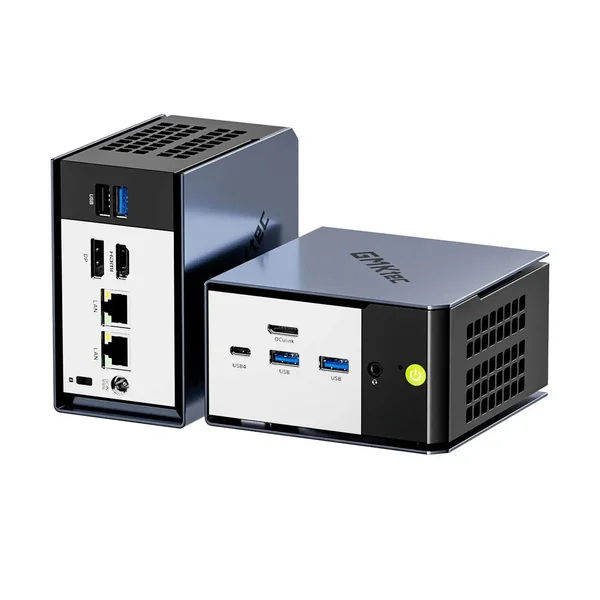
Mini PCs use the 4-lane version. Every GMKtec model with the port in our catalog lists it as PCIe 4.0 ×4.
USB4 and Thunderbolt carry USB, DisplayPort and PCIe through one link; the USB-IF describes USB4 by its “multi-protocol tunneling”. OCuLink does not: ChargerLAB calls it “a pure PCIe channel” with no DisplayPort channel. In practice:
- No video. The monitor plugs into the graphics card, not the mini PC.
- No power. ACEMAGIC: “OCuLink carries no power, so the dock’s PSU feeds the graphics card, including slot power.”
- No hot-plug on these mini PCs: you connect it with everything switched off (see below).
Source: SNIA SFF-8611 Rev 1.0: MiniLink 4X/8X cable plugs and assemblies (OCuLink 1.0 connector) ↗
OCuLink, USB4 and Thunderbolt in numbers
- OCuLink at PCIe 4.0 ×4: 16 GT/s per lane with 128b/130b encoding, about 7.88 GB/s in each direction. Makers often write “64 Gbps”: that is the raw line rate before encoding.
- Thunderbolt 4: a 40 Gbps link; Intel’s minimum for PCIe data is 32 Gbps.
- USB4: up to 40 Gbps, but Intel’s comparison table sets its minimum at 20 Gbps and gives no PCIe minimum, so a USB4 port may carry less.
- Thunderbolt 5 and USB4 Version 2.0: 80 Gbps, or up to 120 Gbps in one direction (Intel calls it Bandwidth Boost); Intel’s PCIe minimum for Thunderbolt 5 is 64 Gbps.
The headline rate is not what reaches the graphics card. On the same MINISFORUM AtomMan X7 Ti, XDA’s 3DMark PCIe bandwidth test measured 2.42 GB/s over USB4 and 6.70 GB/s over OCuLink. On an ONEXPLAYER X1 handheld the same test reached only 3.33 GB/s over OCuLink, so not every OCuLink port runs at full speed. GMKtec makes the same warning in its own guide: “PCIe lane specifications and aggregate USB4 link rates describe different things.”
In our catalog, Thunderbolt 5 appears only on Macs, and Apple says “To use an eGPU, a Mac with an Intel processor is required.” Every Mac we list has Apple silicon. Four MINISFORUM models have 80 Gbps USB4 v2 ports instead: the three versions of the MS-02 Ultra and the MS-S1 MAX. An MS-02 Ultra is the machine behind Notebookcheck’s USB4 v2 result below.
Source: Intel: Thunderbolt technology overview, minimum PCIe data rates ↗
Same mini PC, same card: what changing the link costs
The fairest tests keep the computer and the graphics card and change the connection. Three did:
- Notebookcheck, RTX 4090 on a MINISFORUM MS-02 Ultra (Core Ultra 9 285HX): in Cyberpunk 2077 at 4K Ultra with FSR off, 71.3 fps over OCuLink, 61.3 fps over USB4 v2 with the same DEG2 dock, and 49.4 fps over plain USB4 through a different dock, the Peladn Link S-1. At 1080p Ultra: 153.5, 134.9 and 86.9 fps. MINISFORUM supplied the DEG2.
- Notebookcheck, GPD G1 (Radeon RX 7600M XT) on a MINISFORUM UM780 XTX (Ryzen 7 7840HS) at 1080p: Metro Exodus ran at 73 fps over OCuLink and 28.2 over USB4; Strange Brigade at 181.3 and 78.6. Notebookcheck’s charts list the USB4 link as PCIe 3.0 ×4.
- PC Gamer, RTX 4090 on a MINISFORUM AtomMan X7 Ti (Core Ultra 9 185H) at 1440p: Cyberpunk 2077 with ray tracing, frame generation and DLSS reached 102 fps through a Razer Core X Chroma, a Thunderbolt 3 enclosure, on the X7 Ti’s USB4 port and 145 fps through MINISFORUM’s DEG1 over OCuLink. Here the enclosure changed along with the link.
The gap depends on the game and the card: 14% at 4K between OCuLink and USB4 v2 in Cyberpunk, and well over half the frame rate in Metro Exodus on plain USB4.
Source: Notebookcheck: Minisforum DEG2 with an RTX 4090 over OCuLink, USB4 v2 and USB4 ↗
OCuLink against a desktop slot
OCuLink still gives a graphics card four PCIe lanes where a desktop slot gives sixteen. TechPowerUp limited an RTX 5090 to the bandwidth of PCIe 4.0 ×4 on a Ryzen 7 9800X3D desktop. Across 25 games it kept 89% of its full-speed performance at 1080p, 90% at 1440p and 94% at 4K.
A mid-range card loses less. An RTX 5060 Ti 16 GB limited to PCIe 3.0 ×8, the same bandwidth as 4.0 ×4, kept 96, 97 and 98%.
Those are desktop tests with a desktop processor. A real OCuLink setup adds a cable, a dock and the mini PC’s own processor, which can also limit frame rates at lower resolutions (next section).
Source: TechPowerUp: NVIDIA GeForce RTX 5090 PCI-Express scaling ↗
The mini PC’s processor sets a ceiling
Notebookcheck has reviewed three mini PCs from our catalog with an RTX 4090 over OCuLink, in separate reviews, and its M7 Ultra review charts their Cyberpunk 2077 results side by side (Ultra, FSR off; GMKtec lent the M7 Ultra):
- At 4K: MINISFORUM AI X1 (Ryzen 7 255) 74.9 fps, GMKtec M7 Ultra (Ryzen 7 PRO 6850U) 73.4, MINISFORUM UM890 Pro (Ryzen 9 8945HS) 72.3.
- At 1080p: UM890 Pro 146.9 fps, AI X1 135.5, M7 Ultra 117.2. The M7 Ultra also gave 117.1 at 1440p, so dropping to 1080p did not raise its frame rate.
At 4K the three landed within 3 fps of each other; at 1080p they were about 30 fps apart. As TechPowerUp notes in its scaling test, lower resolutions are where “the bottleneck tilts closer to the CPU”, even though the higher frame rates there also send more data over the link.
Chimolog saw the same with an RTX 5060 Ti in a DEG1 on a GMKtec EVO-X1 (Ryzen AI 9 HX 370): Zenless Zone Zero ran at 70.2, 70.9 and 73.9 fps on High, Medium and Low at 1080p, and the reviewer names a CPU bottleneck in games such as this one.
Source: Notebookcheck: GMKtec NucBox M7 Ultra review, RTX 4090 over OCuLink ↗
What else you need
Besides the mini PC, an OCuLink setup needs four things:
- A dock with its own power. The mini PC’s power adapter does not normally feed a desktop graphics card (GMKtec).
- A graphics card and a power supply sized for it, unless the dock includes them.
- A monitor connected to the graphics card. Using the mini PC’s own HDMI or DisplayPort means, in ACEMAGIC’s words, “every frame travels back over the cable, costing bandwidth and frame rate.”
- The cable that comes with the dock. ChargerLAB measured the DEG1’s at about 66 cm; AOOSTAR lists 50 cm for the AG01. GMKtec’s advice is to use the cable type and length the dock maker recommends. Testing on Raspberry Pi computers, Jeff Geerling found that cables and adapters are not all equal: an adapter with a PCIe ReDriver fixed cards that failed on a DEG1.
Four docks, from their makers’ pages:
- MINISFORUM DEG1: one OCuLink input (PCIe 4.0 ×4); you add an ATX or SFX power supply and the card.
- MINISFORUM DEG2: OCuLink plus Thunderbolt 5 / USB4 v2 (80 Gbps) inputs and up to 140 W of power delivery to the host; you add the power supply and the card.
- AOOSTAR AG01 and AG02: a built-in 800 W power supply; you add the card. The AG01 has OCuLink only, the AG02 OCuLink and USB4. AOOSTAR’s AG01 page lists a 220 V input, so check the US version.
- GMKtec AD-GP1: the graphics are built in, a Radeon RX 7600M XT with 8 GB, with OCuLink (PCIe 4.0 ×4) and USB4 inputs and a 240 W power supply included. GMKtec’s European store lists it as sold out and EU-only at the time of writing.
A dedicated port or an M.2 adapter
28 of the 193 models in the MiniPC.guru catalog on October 18, 2026 have OCuLink, all from GMKtec (14) and MINISFORUM (14). How they provide it differs:
- GMKtec, 14 models: a dedicated port listed as PCIe 4.0 ×4, such as the K8 Plus and the EVO-X1.
- MINISFORUM AI X1 Pro (HX 370 and HX 470): a dedicated OCuLink connector alongside three M.2 slots (AI X1 Pro 470).
- MINISFORUM, 11 models: an adapter board that takes one of the two M.2 SSD slots: the AI X1 (255, 260, 365, HX 370 and HX 470), M1 Pro 125H, UM760 Plus, UM870 Plus, UM880 Plus, UM890 Pro and X1 Lite. MINISFORUM lists the UM880 Plus port as “OCuLink ×1 (via M.2 to OCuLink adapter board)”, and its support site has an “Oculink adapter install” tutorial for the UM760 Plus, UM870 Plus, UM880 Plus and UM890 Pro. With the board fitted, that slot holds no SSD, so plan storage first.
- MINISFORUM M1 Pro 285H: its page lists an OCuLink connector without saying how it is wired; check before you buy.
All 28 also have USB4, so the same machine can use a USB4 dock too. See barebone or complete for how SSD slots and kits work.
Source: MINISFORUM: UM880 Plus specifications (OCuLink via M.2 adapter board) ↗
Connecting it without trouble
- Switch everything off first. GMKtec’s K8 Plus page: “The OCulink port does not support hot-plugging. Please connect or disconnect the cable only when the device is powered off.” AOOSTAR and ACEMAGIC say the same, ServeTheHome found that plugging a DEG1 into a running mini PC did not work, and ACEMAGIC adds that sleep is not enough: shut down fully.
- Dock first, then the PC. ACEMAGIC: “switch on the PSU and dock first, wait a few seconds for the GPU fans to spin, then start the mini PC.” The DEG2 instead powers on automatically with the host.
- Keep your BitLocker recovery key at hand. Microsoft lists docking a portable computer and BIOS or UEFI firmware upgrades among events that can trigger BitLocker recovery (it does not mention eGPU docks) and suggests suspending BitLocker before planned changes. Win And I net warns that connecting an OCuLink dock, to the X1 Lite or other PCs, can cause a BitLocker error that asks for the recovery key.
- BIOS and driver. If the card isn’t detected, ACEMAGIC suggests enabling the OCuLink or PCIe port in the BIOS and setting the external card as the primary display. Then install the NVIDIA, AMD or Intel driver and reboot. On the X1 Lite, Win And I net’s RTX 3060 in a DEG1 was recognised by Windows without a driver install.
Source: GMKtec: NucBox K8 Plus specifications (OCuLink not hot-pluggable) ↗
When USB4 or Thunderbolt is the better choice
OCuLink wins on bandwidth. USB4 and Thunderbolt win on convenience:
- Plug in while running. Unlike USB4, OCuLink is not hot-swappable (Win And I net).
- One cable for more. A USB4 or Thunderbolt port can also carry USB, display and charging; the DEG2 supplies up to 140 W to the host over its Thunderbolt 5 / USB4 v2 port.
- More computers have it. In our catalog, 88 more models list USB4 or Thunderbolt but no OCuLink, 4 are unconfirmed, and 73 have neither.
Docks with both inputs, such as the DEG2, the AG02 and the AD-GP1, can start on USB4 and move to OCuLink later. For which built-in graphics are enough without any dock, see our gaming guide.
Source: USB-IF: USB4 Version 2.0, up to 80 Gbps, multi-protocol tunneling (2022) ↗
About this data (30)
- SNIA SFF-8611 Rev 1.0: MiniLink 4X/8X cable plugs and assemblies (OCuLink 1.0 connector) ↗
- ChargerLAB: an inventory of OCuLink products (“a pure PCIe channel”) ↗
- USB-IF: USB4 Version 2.0, up to 80 Gbps, multi-protocol tunneling (2022) ↗
- Intel: Thunderbolt technology overview, minimum PCIe data rates ↗
- Techgage: PCIe 4.0 ×4 at 7.88 GB/s per direction ↗
- Apple Support: use an external graphics processor with your Mac ↗
- XDA Developers: OCuLink eGPU hands-on, 3DMark PCIe bandwidth USB4 vs OCuLink ↗
- Notebookcheck: Minisforum DEG2 with an RTX 4090 over OCuLink, USB4 v2 and USB4 ↗
- Notebookcheck: GPD G1 eGPU review, Radeon RX 7600M XT over USB4 and OCuLink ↗
- PC Gamer: state of play for eGPUs, Thunderbolt vs OCuLink vs desktop slot ↗
- TechPowerUp: NVIDIA GeForce RTX 5090 PCI-Express scaling ↗
- TechPowerUp: NVIDIA GeForce RTX 5060 Ti PCI-Express x8 scaling ↗
- Notebookcheck: GMKtec NucBox M7 Ultra review, RTX 4090 over OCuLink ↗
- Chimolog: MINISFORUM DEG1 with an RTX 5060 Ti on the GMKtec EVO-X1 (Japanese) ↗
- MINISFORUM: DEG1 eGPU dock (store page) ↗
- MINISFORUM: DEG2 OCuLink eGPU dock (store page) ↗
- AOOSTAR: AG01 eGPU dock with OCuLink and built-in power supply (FAQ compares AG02) ↗
- AOOSTAR: AG02 eGPU dock with OCuLink and USB4, built-in power supply ↗
- ServeTheHome: MINISFORUM DEG1 OCuLink dock with a mini PC ↗
- GMKtec: AD-GP1 external GPU dock with a Radeon RX 7600M XT ↗
- ChargerLAB: review of the MINISFORUM DEG1 OCuLink dock ↗
- Jeff Geerling: not all OCuLink eGPU docks are created equal ↗
- MINISFORUM: UM880 Plus specifications (OCuLink via M.2 adapter board) ↗
- MINISFORUM Support: product information and Oculink adapter install tutorials ↗
- ServeTheHome: MINISFORUM UM890 Pro review (M.2 slot or OCuLink board) ↗
- GMKtec: NucBox K8 Plus specifications (OCuLink not hot-pluggable) ↗
- ACEMAGIC: how to connect an OCuLink eGPU to a mini PC ↗
- Microsoft Learn: BitLocker recovery overview (events that trigger recovery) ↗
- Win And I net: MINISFORUM X1 Lite review with a DEG1 and RTX 3060 (Japanese) ↗
- GMKtec Europe: OCuLink vs USB4 for an eGPU on a mini PC ↗
Related Mini PCs
Open a model to see its configurations, specifications and the store prices we track.